


AI Music Video Maker - Rap AI
4.5121.00 Reviews
App Specs
- Version
- 1.6.1
- Updated On
- License
- Free
- Downloads
- 100,000+
- Developer
- Mobobi LLC
- Categories
- Art & Design
- Platform
- Android
Screenshots
 Analysis by AppCompare
I approached AI Music Video Maker - Rap AI as someone who needed to turn a rough creative idea into a shareable video without opening a full desktop editor. That starting point matters because this is not simply a music player or a conventional drawing tool. It sits in the art and design space, using artificial intelligence to help shape music-video concepts from text, audio, and video. My impression is that it is most useful when you already have a mood, a short story, or a visual direction in mind and want to see that idea become something watchable quickly.
The app is free to install, with optional purchases ranging from $2.99 to $19.99 per item. That makes it easy to test before committing, although the free experience should be viewed as an entry point rather than an unlimited replacement for a professional production suite. Mobobi LLC is the developer, and the app carries an Everyone age rating, so its general presentation is approachable for casual creators, students, musicians, and families working on suitable projects.
From a rough idea to a finished AI music video
I start with the moment a loose musical idea becomes a visual brief, because that is where this app is most useful: it can help me explore a direction before I commit to a full edit or shoot. I’ll also look at how I would keep that process manageable when generation gets demanding, then weigh the app’s reliability and device fit against the control of a traditional editor.
The best starting condition is a clear creative brief
My first recommendation is to avoid opening the app with a vague request such as “make something cool.” AI video tools tend to produce more useful results when the starting instruction has a subject, setting, mood, movement, and musical identity. For example, I would begin with a description of a rapper performing in a rain-soaked city at night, with quick cuts, reflective streets, and a tense atmosphere. That gives the app more to work with than a single genre label.
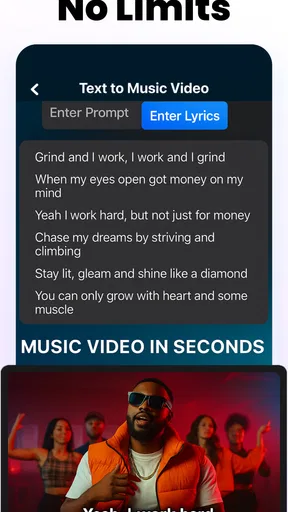
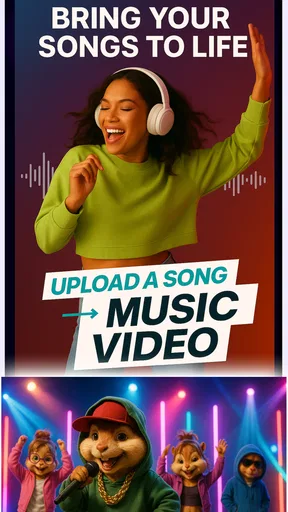
The store summary points to creating AI videos from text, audio, and video, along with support for Sora 2 and Veo 3. In practical terms, that makes the app feel like a bridge between an idea and a visual draft. I would use text when the concept exists mainly in my head, audio when the song or voice recording is already finished, and video when I have clips that need a stronger music-video treatment.
This distinction is one of the more useful things to understand before starting. A text-led project is about invention. An audio-led project is about giving an existing track a visual identity. A video-led project is closer to transformation or assembly. Treating those as separate workflows helps prevent disappointment, because the same prompt will not be equally effective for every kind of source material.
Building the first version without overloading the prompt
I found it more sensible to create a focused first pass than to describe an entire short film in one paragraph. A compact instruction can establish the main character, location, color direction, camera energy, and relationship to the music. Once the initial result has a recognizable identity, I can decide what needs changing. If I include too many unrelated scenes at once, the visual idea becomes harder to control.
Worth Reading Before You Choose

EA SPORTS FC Mobile 26 Is a Bigger Football Game, but It Takes Time

Flipboard Shows What News Apps Must Do Beyond the Feed

Switching to Android Auto Means Rethinking Your Driving Routine

Google Calendar Makes a Crowded Week Easier to Manage

Ludo King Makes the Most of the Minutes Between Plans

Baby Panda World Brings Quick Play to Modern Phones, but Its Game Library Feels Busy
A practical workflow is to write the prompt in layers. I start with the central action, add the environment, then specify the emotional tone and pacing. If the track is aggressive, I might ask for sharper transitions and more kinetic movement. If it is reflective, I would choose slower visual changes and a restrained setting. This is not a guarantee of a perfect output, but it makes the revision process more deliberate instead of turning into random prompt changes.
The app’s focus on rap and music-video creation is helpful here. I would not approach it as a general-purpose filmmaking environment with detailed control over every shot. Its strength is the fast conversion of a musical concept into an expressive visual draft. That makes it especially appealing for independent artists who need cover content, social previews, mood pieces, or a visual companion for a demo.
Using audio as the anchor
When I already have a finished song, the audio should be treated as the project’s anchor rather than an afterthought. Before generating visuals, I would listen for the opening mood, the first major change, the chorus, and any lyrical moment that deserves emphasis. Even without manually editing every beat, knowing those landmarks helps me judge whether the generated video feels connected to the track.
This is also where expectations need to stay realistic. An AI-generated visual may capture the general energy of a song without matching every lyric or drum hit precisely. For a quick social post, that looseness can be acceptable. For a lyric-sensitive music video where every scene must illustrate a specific line, a conventional editor with timeline control would remain the safer choice.
One useful tactic is to make the first result a mood test. I would not spend time polishing a long concept before checking whether the selected visual direction fits the music. If the colors, movement, or character style feel wrong, it is better to change the concept early than to keep refining a weak foundation.
Bringing existing video into the process
For creators who already have phone footage, the video input changes the app’s role. Instead of asking it to invent everything, I would use it to help reshape the presentation around a song or theme. This could suit a rehearsal clip, a performance in a small room, or casual footage that lacks a strong visual structure.
The handoff from recorded material to generated treatment is where organization becomes important. I would choose source clips with a clear subject and reasonable lighting, then decide what the app should preserve. If the performer’s identity is the most important element, the prompt should reinforce that priority. If the goal is a surreal visual, I would accept that the output may feel less documentary and more interpretive.
This workflow is not identical to applying a simple filter. The appeal lies in changing the creative direction, but that also introduces unpredictability. A standard editor gives me dependable trimming, cropping, and placement. AI generation gives me more imaginative possibilities, but I may need several attempts before the visual treatment supports rather than distracts from the original footage.
Managing the handoff between music, visuals, and final sharing
The most important handoff is the transition from a private idea to a result that another person can understand. A generated video can look impressive in isolation yet fail to communicate the song’s character. I would watch the result once with the sound on and once with the sound low. With audio, I can judge the relationship between movement and music. With reduced audio, I can see whether the imagery still has a coherent rhythm and subject.
I would also check the opening seconds carefully. A viewer deciding whether to continue watching may not wait for the concept to develop. The first visual should establish enough context to make the rest feel intentional. If the opening is confusing, I would revise the prompt around a stronger first scene rather than simply adding more detail to the middle.
For a musician, the finished piece can function as a visual introduction to a track. For a casual user, it may be a creative experiment or a way to turn a voice recording into something more memorable. For a designer, it can serve as a rapid concept board before committing to a more controlled production. Those are different outcomes, and the app is more convincing as a fast idea generator than as the final stage of every project.
What the current release means for everyday use
The app was released on February 13, 2026, and the current version is 1.6.1. It requires Android 7.0 or later, which keeps the compatibility barrier relatively low for people using older supported devices. I would still pay attention to how comfortably the phone handles media generation, because a compatible operating system does not automatically mean every device will feel equally quick or smooth.
Its average rating is 4.6 from over 600 ratings, and it has passed 100K installs. Those figures suggest that the concept has found an audience, but they do not remove the need to test it with my own type of music and source material. A creator working with short rap demos may have a much better experience than someone expecting precise narrative filmmaking or polished commercial production.
The free installation is a genuine advantage for experimentation. I can try the basic workflow before deciding whether the available purchase options make sense for repeated use. I would be careful about starting a large project before understanding how the app handles generation limits, output expectations, and revisions in my own workflow. The optional items are priced from $2.99 to $19.99 each, so frequent experimentation can become a meaningful cost even when the initial download is free.
A realistic everyday scenario
Imagine I have recorded a short rap verse on my phone during a lunch break. The audio is usable, but there is no performance video and no budget for a shoot. I would begin by describing the track’s mood and the kind of setting that fits it, then use the recording as the emotional reference. My first goal would not be a complete official video; it would be a short visual draft that shows whether the song feels better with urban realism, animation-like imagery, or a more dramatic atmosphere.
After reviewing the first result, I would identify one problem at a time. If the visuals are too bright, I would adjust the lighting and palette. If the scenes feel disconnected, I would simplify the locations. If the performer does not feel central, I would make the subject and camera relationship more explicit. This staged approach is more productive than rewriting every part of the instruction after each attempt.
The final result could then be used as a private reference, a teaser, or a conversation starter with a video editor. That is a strong everyday use case because it turns an unfinished song into something easier to evaluate. I can show the visual direction to collaborators before paying for filming, and I can discover whether the track suggests a story, a performance piece, or an abstract montage.
Where the flow breaks down
The biggest weakness is the loss of control that comes with AI generation. If I need the same character to appear consistently across many scenes, exact blocking, or a carefully timed visual response to individual lyrics, the app may not provide enough precision. A traditional mobile editor is less exciting, but it is better when the goal is dependable arrangement rather than creative surprise.
Another point of friction is revision. AI tools can make changing one element affect several others. Asking for a different location may also alter the mood, camera movement, or appearance of the subject. That means I would save the wording that produced a promising direction and change only a small part at a time. Keeping a simple note of successful prompts is a surprisingly valuable habit because it makes the process repeatable.
Source quality matters as well. A noisy recording, unclear footage, or an overloaded concept gives the app less useful material to interpret. I would clean up the input first when possible: record the audio in a quiet place, choose clips with a visible subject, and decide what the viewer should notice. This preparation does not make the result fully predictable, but it reduces avoidable confusion.
I would also skip this app if my main need were detailed audio mixing, multitrack production, professional color correction, or frame-accurate editing. A dedicated digital audio workstation, a conventional video editor, or a desktop production program will be a better fit for those jobs. The app earns its place when speed, experimentation, and visual ideation matter more than complete manual control.
Who will get the most from it
I think the strongest audience is made up of independent musicians, beginner creators, social-content makers, and anyone who has a song but no obvious visual plan. It can help break the blank-page problem by turning a verbal idea into a concrete reference. That alone can be valuable, especially when collaborators struggle to imagine the same concept from a conversation.
It may also suit people who enjoy testing several creative directions quickly. One track can suggest a dark performance setting, a stylized city sequence, or an abstract visual world. The app makes that kind of comparison more accessible than arranging a full shoot for every possibility.
On the other hand, I would not recommend relying on it as the only tool for a serious production with strict continuity requirements. The more a project depends on exact repetition, precise timing, and predictable edits, the more the weaknesses become visible. In that situation, I would use it for concept development and then move the chosen direction into a conventional editor.
My final take after following the complete workflow
AI Music Video Maker - Rap AI works best as a fast creative partner between a rough musical idea and a visual draft. Its text, audio, and video-oriented approach gives me several ways to begin, while the references to Sora 2 and Veo 3 position it toward ambitious AI-assisted video creation. I like it most when I treat the output as a direction to evaluate, not as a guaranteed finished production.
The app is easy to justify as a free experiment, particularly for someone who wants to see whether a track can support a compelling visual identity. The Everyone rating and Android 7.0 requirement also make it approachable for a broad audience. Still, the optional purchases mean I would test the workflow carefully before using it for frequent generation, and I would keep a traditional editor nearby for precise finishing work.
My recommendation is straightforward: try it if you have music, a visual idea, and a willingness to revise. Start with a short, focused brief, use the audio as a creative anchor, inspect the opening carefully, and change one prompt element at a time. If you need exact control from beginning to end, choose a conventional editing tool instead. If you want to discover what your song might look like before investing in a larger production, this app offers a practical and imaginative place to start.
Pros
- Turns written lyrics into rap-style video concepts quickly.
- Useful for experimenting with different AI-generated music ideas.
- Simple workflow suits beginners without editing experience.
- Can help create social media content in a short time.
- Offers a creative starting point for personal music projects.
Cons
- AI vocals may sound repetitive or lack natural emotion.
- Output quality can vary depending on the prompt and lyrics.
- Advanced users may find customization and editing options limited.
- Generated videos may feel formulaic compared with professional productions.
- Some features or exports may require in-app purchases or subscriptions.
FAQs for AI Music Video Maker - Rap AI
What is AI Music Video Maker - Rap AI, and what can it do?
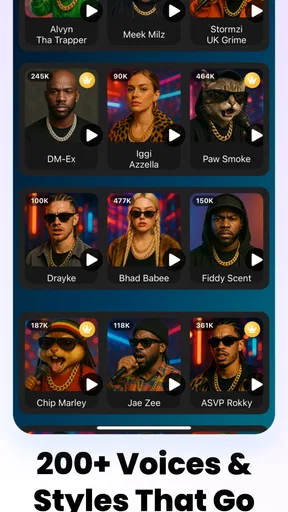
AI Music Video Maker - Rap AI is designed to help users create music-focused videos with artificial intelligence. You can typically combine a song or rap track with lyrics, images, visual effects, and automatically generated scenes. It is aimed at beginners who want to produce social-media-ready content without advanced video-editing skills, although the final results can vary depending on the audio, prompts, and available templates.
Can I use my own music, lyrics, or images in the app?
The app generally focuses on turning personal creative ideas into short music videos, so users may be able to import their own audio, lyrics, photos, or other media, depending on the current version and device permissions. Before starting a project, check the supported file formats and storage requirements. You should also make sure that you own, or have permission to use, any music, images, voices, or lyrics you upload.
Does AI Music Video Maker - Rap AI create complete rap songs by itself?
The app may assist with rap-related content, visuals, lyrics, or music-video production, but it should not necessarily be treated as a complete professional music studio. AI-generated results can require editing, especially when you want accurate pronunciation, consistent rhythm, strong storytelling, or a specific artistic style. Consider it a creative assistant that helps you develop ideas and assemble a video rather than a replacement for every part of music production.
Is the app free to download, and are there in-app purchases or limitations?
The download may be free, but features such as premium templates, higher-quality exports, additional AI generations, watermark removal, or extended video length can be restricted behind subscriptions or one-time purchases. Pricing and available features may change by platform and region. Review the app-store listing and subscription screen carefully before confirming payment, particularly if the app offers a free trial that automatically renews.
Is it safe to publish videos created with AI Music Video Maker - Rap AI?
You can usually export and share finished projects, but you remain responsible for the content you publish. Avoid using copyrighted songs, celebrity likenesses, unauthorized samples, or images belonging to other people without permission. Also review the app’s privacy policy before uploading personal photos, recordings, or unreleased music, because some AI services may process content online. Check every generated scene for inaccurate, offensive, or misleading material before sharing it publicly.


